
Guide · Art-Net
Art-Net DMX control from Windows.
DMX over ethernet: what it is, and how to set it up.
What is Art-Net?
Art-Net is a protocol that sends DMX512 data over an ordinary ethernet network. Instead of a DMX cable running from your computer, the data travels across your network as UDP packets to an Art-Net node - a small box that converts it back into a regular DMX signal for your fixtures.
Each universe carries 512 channels, and Art-Net can carry many universes down a single network cable. That is the advantage: one cheap ethernet run replaces a bundle of DMX lines.
Art-Net or USB DMX?
Both work well with SDC, so it comes down to your setup.
One universe, no network
A USB-to-DMX interface such as the Enttec DMX USB Pro, or an Open DMX-style device, is plug-and-play and needs no network at all. See the USB DMX guide.
More universes, longer runs
If you need more than one universe, the distance is long - ethernet does 100 m without complaint - or the venue already has a network. Nodes come with one to eight or more DMX outputs, so it scales with the rig.
What you need
- ·A Windows PC running SDC
- ·An Art-Net node - any brand, SDC is not locked to specific hardware
- ·An ethernet cable between them, or a shared network
Setting up Art-Net in SDC
Connect the node to the same network as the PC. SDC finds it automatically, so you rarely need its IP address - but note it down if you prefer to enter it by hand.
Open SDC and go to Settings.
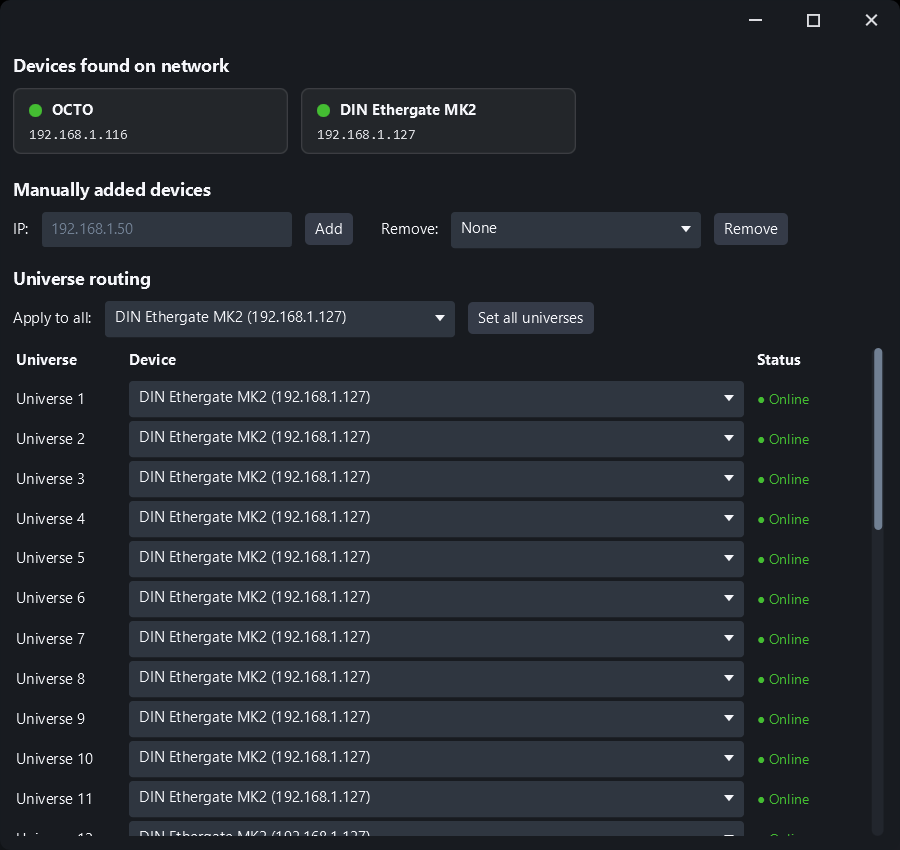
Open Art-Net Routing and assign the universe to your node. SDC discovers nodes on the network automatically.
That is it. SDC's built-in discovery sends an ArtPoll to the network and lists the nodes that answer, so you can confirm the node is alive before patching a single fixture.
Each of SDC's 32 universes is routed independently, so universe 1 can go to the node over the stage and universe 2 to one at the back of the room. Devices that are offline stay in the list, so your routing is still there when the node comes back.
Common problems and fixes
No output at all
Check that your PC and the node are on the same subnet. Some nodes default to a 2.x.x.x address while home routers use 192.168.x.x - either change the node's IP to match your network, or give your PC a second IP in the node's range.
Firewall blocking it
Art-Net uses UDP port 6454. If Windows asks for network permission the first time you run SDC, allow it.
Flickering or lag over wifi
Art-Net does work over wifi, but a wired connection is always more reliable for a live show.