
Guide · APC Mini
Akai APC Mini MK2 as a DMX surface.
Physical faders and pads for your show, over plain USB.
Why the APC Mini MK2?
64 RGB-backlit pads and 9 faders, in a unit small enough for a backpack, typically at a fraction of the price of a hardware DMX console. It connects over plain USB - no drivers, no MIDI interface needed.
SDC supports it directly: map its pads and faders to buttons and faders in SDC and trigger scenes or ride levels without touching the mouse. More than one APC Mini MK2 can be used at once.
What you need
- ·A Windows PC running SDC
- ·An Akai APC Mini MK2 connected by USB
- ·Your DMX output as usual - a USB interface or an Art-Net node
Assigning pads and faders
Connect the APC Mini before starting SDC.
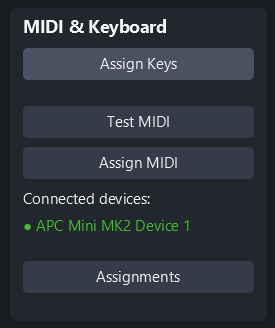
In SDC, select the button you want to control.
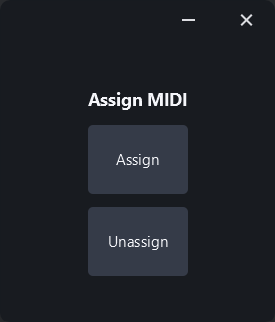
Press Assign.
Press the corresponding pad on the APC Mini.
That pad now triggers the function. Faders work the same way: assign an APC fader to a scene fader in SDC and it controls the level directly.
Your mappings are remembered
SDC saves your assignments with your setup, tied to the controller's serial number. Unplug the APC Mini, take it to the venue, plug it back in - everything is mapped exactly as you left it.
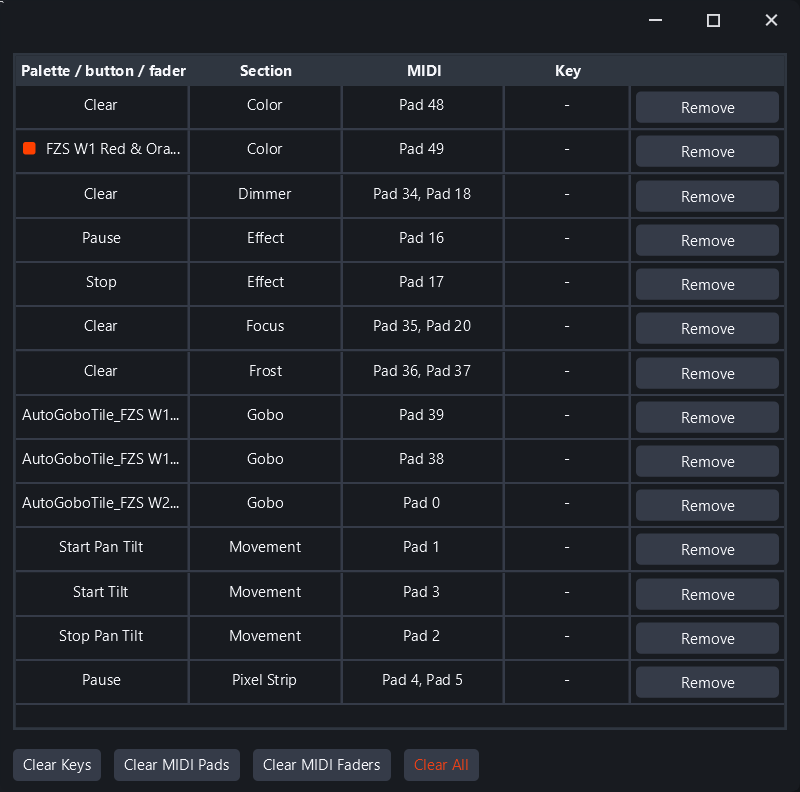
To see everything you have mapped, open Assignments in the MIDI & Keyboard panel. It lists every palette, button and fader with its pad, fader or key, and you can remove a single mapping or clear them all.
Pad colors
The MK2's pads are RGB-backlit, and SDC color-codes your assignments automatically - each function type gets its own color, so gobos, effects and scenes each light up differently on the controller. One glance tells you what is mapped where. In a dark booth, that matters.
Tips for a good layout
- ·Put your most-used scene faders on the physical faders - that is where the APC shines.
- ·Group related functions in pad rows.
- ·Keep one pad for blackout, somewhere you can always find it.