
Looking for GDTF DMX software? Simple DMX Controller reads GDTF files and turns them into named channels and ready-made palettes – no more typing in every channel by hand from a PDF manual. And if no GDTF file exists for your fixture, SDC can build one for you. This guide explains what GDTF files are, where to get them, how to make your own, and what SDC does with them.
What is GDTF?
GDTF (General Device Type Format) is an open, standardized file format that describes a lighting fixture: its DMX channels, what each channel does, its color and gobo wheels, movement ranges, and more. One file, written once – usually by the fixture manufacturer – that any GDTF-capable software can read.
Think of it as a driver for your light.
Where do you get GDTF files?
The central library is GDTF-Share.com – a free database run by the industry, with thousands of fixtures uploaded by manufacturers and users. Search for your fixture model, download the .gdtf file, and you’re ready.
If your fixture isn’t there, you can build a GDTF yourself – either with the free online GDTF Builder on the same site, or directly inside SDC.
What SDC does with a GDTF file
This is where a fully built GDTF pays off. When you add a fixture from a GDTF file, SDC reads:
• Channel names, so every fader in Fixture Faders is labeled with its real function (Dimmer, Pan, Gobo 1 and so on) instead of only a channel number
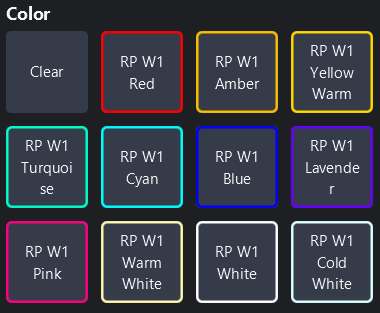
• Color wheels including their actual color codes, so color palettes show the true output color.
• Gobo wheels by name, so gobo palettes show the shape you will get
SDC builds ready-to-use palettes from that wheel data automatically. A freshly patched fixture is usable within seconds, before you’ve saved a single thing yourself.
Adding a GDTF fixture in SDC
1. Get the .gdtf file, either downloaded from GDTF-Share or made in SDC with one of the GDTF Makers.
2. In SDC, open Add Fixture.
3. Load the GDTF file and choose the DMX mode your fixture is set to.
4. Set the DMX address and the rest of the fixture info.
What if there’s no GDTF for my fixture?
It happens often, especially with budget and no-name fixtures – nobody has ever made a GDTF file for them.
In SDC you just make one. Two GDTF Makers are built in: one reads the fixture’s PDF manual and generates the file automatically, the other lets you enter the channels manually. Both are covered in the next section.
Two other routes are worth knowing about. If you want your fixture to end up in the public library so everyone with the same model benefits, you can upload your file to GDTF-Share or build it there with the free online GDTF Builder.
Make your own GDTF file in SDC
SDC includes two GDTF Makers, both opened from the Add Fixture page.
Manual To GDTF
Point SDC at the PDF manual that came with your fixture. It reads the channel tables, finds the DMX modes, and pulls out the gobo and color wheel information and writes a finished .gdtf file. This is the fast route. A manual that would take an hour to type in by hand becomes a working fixture file in a couple of minutes, with named channels and automatic palettes ready to go. Manual To GDTF runs as an online service, so it uses tokens. Every user gets two free tokens – enough to try it on your own fixtures and see what comes out. If you need more, extra tokens can be bought from inside SDC.
Simple GDTF Maker
Prefer to do it yourself? The Simple GDTF Maker lets you build the file by hand in SDC – set your channel layout, name each channel, define your color and gobo wheels, and save.
Both Makers save a standard .gdtf file – the same format every other GDTF-capable console and software reads. Nothing is locked to SDC.
FAQ
Can I create a GDTF file in SDC?
Yes. SDC includes two GDTF Makers – one that generates the file from your fixture’s PDF manual, and one where you build it yourself. Both save a standard .gdtf file you can use anywhere.
Does it cost anything to make a GDTF file?
The Simple GDTF Maker is free and unlimited. Manual To GDTF is a service that uses tokens – you get two free, and extra tokens can be bought in SDC.
Is GDTF free?
Yes – the format is open and the GDTF-Share library is free.
What is the difference between GDTF and a fixture library?
Traditional fixture libraries are locked to one software brand. GDTF is one shared format that works across consoles and software.
Does the GDTF file need to be “fully built”?
The more complete the file, the more SDC can do. A minimal file gives you channels – a fully built one gives you named channels, color codes and automatic palettes.
Try it with SDC
Download a GDTF file for one of your fixtures – or make one from your fixture’s manual. Simple DMX Controller is free to use in 2-hour sessions. Unlimited use is $29.99/year.