Art-Net is the easiest way to control DMX lighting from a computer without special USB hardware. This guide explains what Art-Net is, when to choose it over USB DMX, and how to set it up in Simple DMX Controller (SDC) in a few minutes.
What is Art-Net?
Art-Net is a protocol that sends DMX512 data over an ordinary Ethernet network. Instead of a DMX cable running from your computer, the DMX data travels over your network as UDP packets to an Art-Net node – a small box that converts the network data back into a regular DMX signal for your fixtures.
Each DMX universe carries 512 channels, and Art-Net can carry many universes over a single network cable. That’s the key advantage: one cheap Ethernet cable can replace a whole bundle of DMX lines.
Art-Net vs USB DMX – which should you choose?
Both work great with SDC, so it comes down to your setup:
Choose USB DMX if you only need one universe. A USB-to-DMX interface like the ENTTEC DMX USB Pro or an Open DMX-style device is plug-and-play and needs no network at all.
Choose Art-Net if you need more than one universe, the distance is long (Ethernet runs 100 m without breaking a sweat), or you already have a network in the venue. Art-Net nodes are available from one to eight or more DMX outputs, so it scales as your rig grows.
What you need
• A Windows PC running SDC
• An Art-Net node (any brand works – SDC is not locked to specific hardware)
• An Ethernet cable between them, or a shared network/router
Setting up Art-Net in SDC
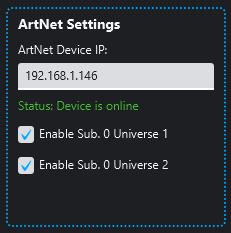
1. Connect the Art-Net node to your network and note its IP address (most nodes ship with a configuration tool or web page that shows it).
2. Open SDC and go to Settings.
3. Open the Art-Net Routing settings and assign the selected DMX universe to your Art-Net node. SDC should automatically discover the node on the network.
That’s it.
SDC includes built-in Art-Net device discovery: it sends an ArtPoll message to the network and lists the nodes that answer, so you can verify your node is alive before you patch a single fixture.
Common problems and fixes
No output? Check that your PC and the node are on the same subnet. Some Art-Net nodes default to a 2.x.x.x IP address, while home routers use 192.168.x.x – either change the node’s IP to match your network, or give your PC a second IP in the node’s range.
Firewall blocking? Art-Net uses UDP port 6454. If Windows asks for network permission the first time you run SDC, allow it.
Flickering or lag on Wi-Fi? Art-Net works over Wi-Fi, but a wired connection is always more reliable for a live show.
FAQ
Is Art-Net free to use?
Yes. Art-Net is a royalty-free protocol – you only pay for the node hardware.
How many universes can SDC output?
32. SDC sends each configured universe as its own Art-Net stream, so multi-universe rigs (for example pixel strips) are no problem.
Can I use Art-Net and USB DMX at the same time?
Yes – SDC can drive both outputs.
Does SDC work with any Art-Net node?
Yes. Art-Net is a standard – SDC works with all Art-Net devices.
Try it with SDC
Simple DMX Controller is free to use in 2-hour sessions – download it, point it at your Art-Net node, and you’ll have lights moving in minutes. Unlimited use is $9.99/year.